Wednesday, March 23, 2022

Student's Portfolio


School History:


  Madras Christian College Higher Secondary School, Chetpet, Chennai-31.


Founding:

        MCC School has its roots in a small school for boys established in 1835 when two chaplains of the Church of Scotland in Madras, Rev. George James Laurie and Rev. Matthew Bowie founded the St. Andrew's School on Randalls Road in Egmore, Madras. At their request, the Church of Scotland sent a missionary to India to govern it. Missionary Rev. John Anderson, set up the institution as the General Assembly School,[3] conducting classes in a rented house on the east side of Armenian Street in Georgetown, Madras. The headmaster and 59 boys from St. Andrew's School moved to this institution. It was named after the supreme governing body of the Church of Scotland and aimed at attracting students from the Hindu higher castes with the aim of "conveying as great as an amount of truth as possible through the channel of a good education especially of Bible truth".


MCC School Life:

  • MCC School has a variety of extra-curricular activities. The school conducts cultural, Annual day, Investiture and Competition for other schools.
  • Students follow the Indian tradition of wishing teachers with folded hands Namaskaram position. Assembly is conducted every day to teach and train students with current affairs, Punctuality, Thirukkural, New English words, Prayer, Bible and Moral stories.
  • Classes run from 8 AM - 4 PM(IST) with periods of either 45 Minutes or 40 Minutes each. There are three breaks through the day after every two periods. There are also weekly physical training and art classes.
  • MCC has two fee structures: Aided and Self-Financed. Self-Finance is Co-Education (boys and girls) and Aided is only Boys. While studying in MCC students are called as MCCIANS.

Clubs:

  • Scripture Club
  • Science Club
  • Maths Club
  • Science club
  • English club
  • Newsletter Club
  • Commerce Club
  • Computer Club
  • Junior Red Cross Club
  • Interact Club
  • Music Club
  • Craft Club
  • Art Club
  • Photography Club
  • UNESCO Club
  • Sports Club
  • Electronic Awareness Classes
  • Quiz Club
  • Literary Association
  • Cultural Club
  • Papyrus Club
  • AFS
  • Library Club
  • Band
  • Literary Club
  • Newspaper In education
  • Dance Club
  • Multipurpose Hall
  • Swimming Pool

Uniformed services

  • NCC
    • Army Wing
    • Air Wing
    • Navy Wing
  • NSS
  • RSP
  • Scouts
  • Guides
  • Junior Red Cross

Playground

MCC is mainly famous for their playground and infrastructure. MCC have Tennis Court, Cricket Ground, Football Court, Volleyball Court and Basketball Court in their campus.


Facilities

MCC have RO water, Hostels, 2 Canteens, Clean Bathrooms, largest Playground, Smart Class, 2 Computer labs, 2 Physics Lab, 2 Chemistry Lab, Big Auditorium with AC, Cycle Parking, Lunch also provided for day scholar(optional), Library and More..


                                                                    Visual Hall with AC


Index of Student's Activity in Madras Christian College Higher Secondary School, Chetpet, Chennai-31.

  • Arts Class
  • NCC
  • Christmas Celebration
  • Classroom Activities 
  • Covid-19 Vaccination Drive
  • Republic Day
  • Equinox
  • Teacher's Day
  • Science Exhibition
  • Mark List VIII Standard
  • Mark List XI Standard                          


Arts Class:
        Art helps to improve fine and gross motor skills and allows to express their emotions in a positive way.

         
            Art enhances hand-eye coordination,  problem solving skills, lateral thinking, complex analysis and critical thinking skills.  
                           

NCC:
      It makes the student to be self-disciplined and provide a suitable environment to motivate the youth to take up a career in the Armed forces.
                         
   
Christmas Day Celebration:

        It is a great way to reward students for working hard and achieving their goals at school and also serves to  help them make positive associations with school.


Classroom activities:
  It helps to develop relationship skills and in many cases lasting relationship. The students learn to manage their time effectively and be pro-active and creative problem solver. It also develops the self-esteem of the students who do not excel academically. 

The classroom activities can be categorized based on LSRW skills such as 

Role Play:  encourages creativity and imagination, fosters social and emotional development, improves communication and language.

Mime Game: improves students vocabulary, they began to show interest by actively answered questions, and enthusiastic while guessing the action word.


Story Chains: promotes students understanding of writing structures but engages them in some fun, creative collaboration too. It helps to reinforce students through narrative writing structures. 

Hangman game for vocabulary learning: It is a great help in stimulating in learning foreign language by guessing letters to reveal a word or phrase. Vocabulary growth is directly related to school achievements.


Tell a photo story: Helps to develop communication skills, the ability to progress in the working world and in life, in career advancement, boosts confidence, critical thinking and many more.

Covid-19 Vaccination Drive: The School Management have welcomed the vaccination drive for developing secure campuses in the midst of pandemic and safeguard against Covid-19 by helping to start physical classes regularly.

Republic Day: celebrated on January 26th,2022.
                                                      

Teacher's Day: celebrated on November 04, 2021


EQUINOX: Science Talent hunt competition conducted in inter-level IT based cultural fest 
Science Exhibition was conducted for the students to enhance their creative thinking and innovation.


Mark List - VIII STD


MARK LIST - XI STD


Thursday, August 5, 2021


 Webex Meetings

Our college has recently conducted an online workshop which was great and we had a wonderful time as a student-teacher how we should be mentally prepared in order to teach the kids and how to be responsible in troublesome situations were discussed during the session. The platform we used was CISCO WEBEX MEETING and for some of you might be knowing and some may not have any idea, it's for the second type of guys i am speaking about, in order to help you out i have shared the steps to organise a meeting, to be the host and keep working on it efficiently.
we have had a wonderful time on this platform with the students of 175 despite the audio and video was struggling with poor network and yet we managed it and learnt something interesting.

Cisco Webex Meetings makes hosting an online meeting easy. You can schedule a meeting in advance or start one right away. When it's time to meet, you can present and collaborate with your team as if you're in the same room.

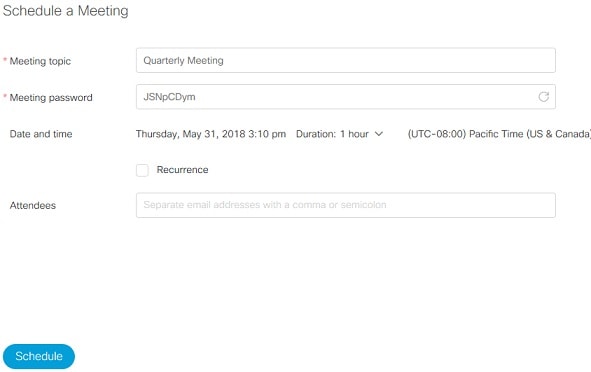
Schedule a Meeting

Sign in to your Webex site and select Schedule. Fill in the necessary meeting information and select Schedule.

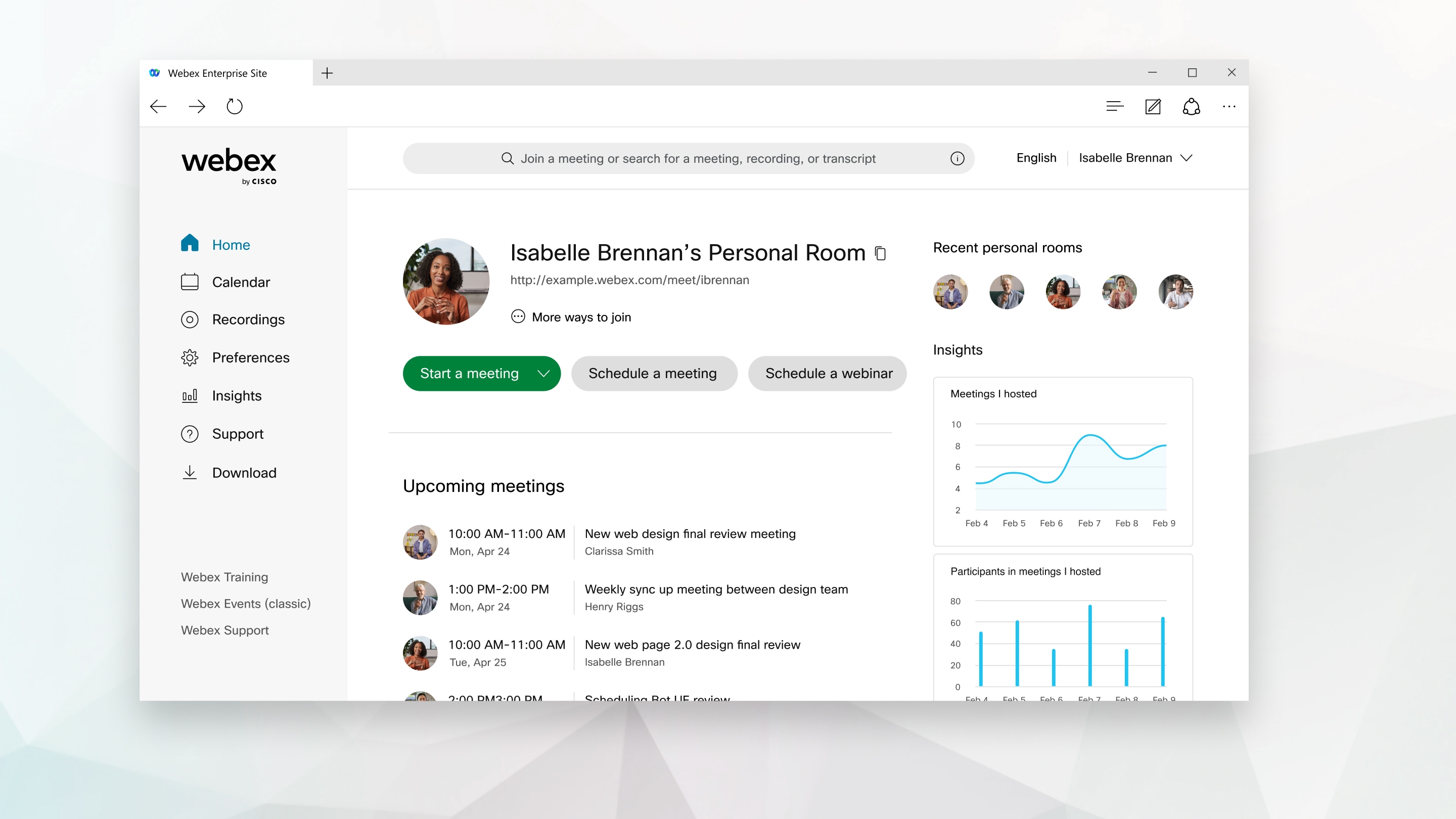
Start a Meeting

At the scheduled meeting time, sign in to your Webex site. From the home page, under Upcoming Meetings, locate your meeting, and then select Start.

If you don't see your meeting, you can select View all meetings to see more scheduled meetings.

You can also start a meeting in your Personal Room.

Connect Audio

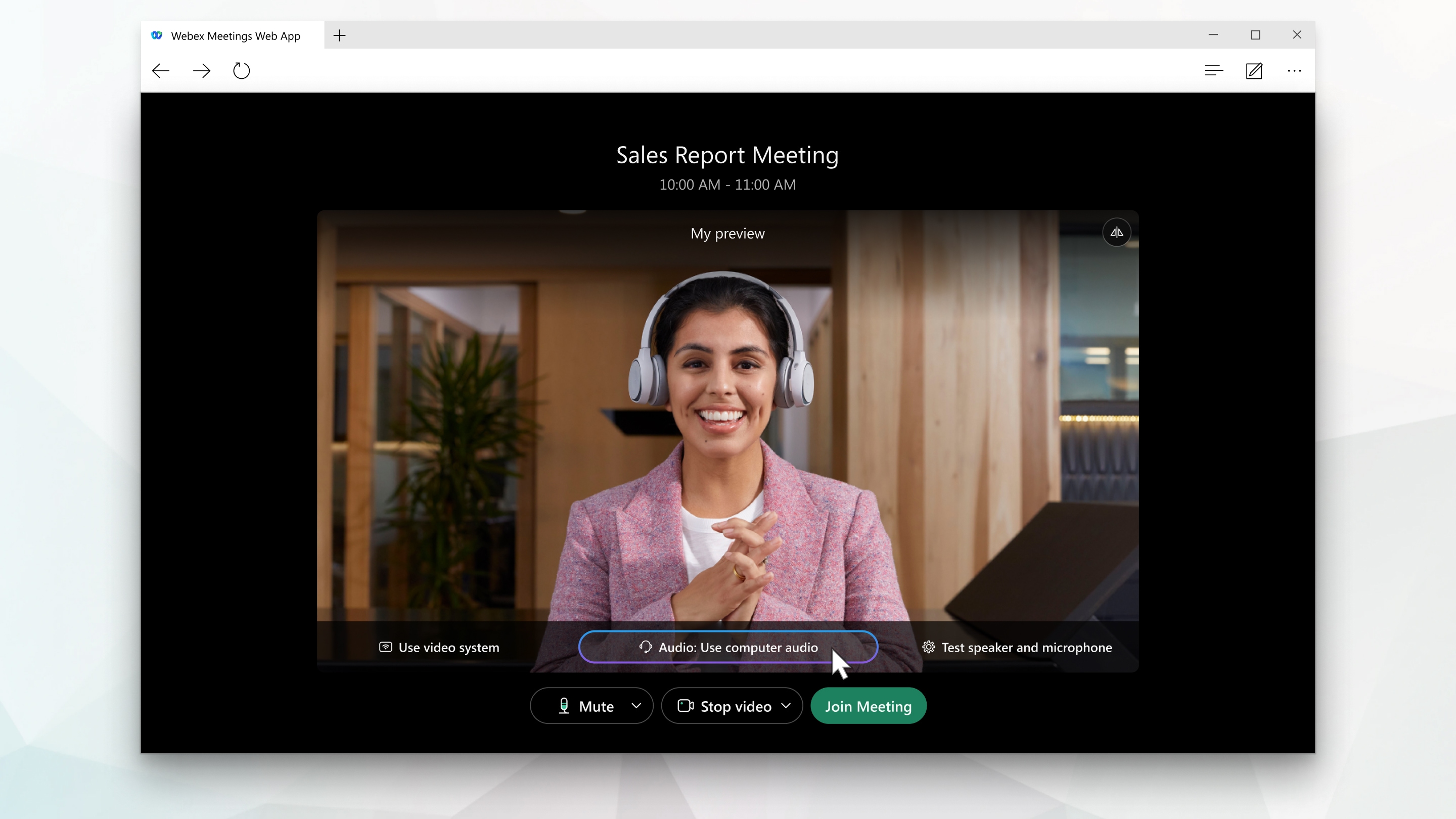
Before you join or start a meeting you can choose the settings you use for audio in the meeting.

  1. Click the audio connection options in the Webex Meetings app.

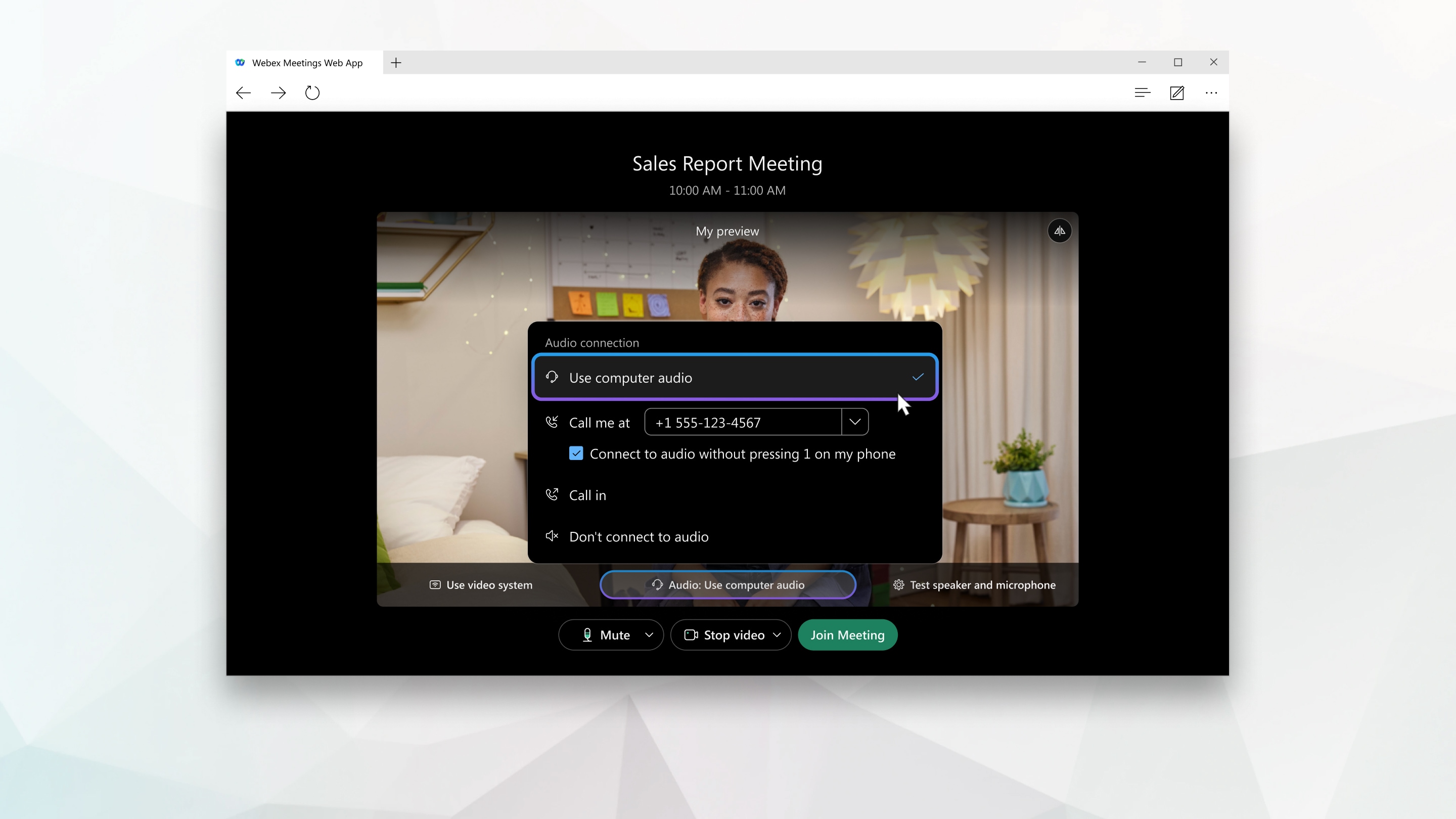
  2. Choose how you want to hear the audio in the meeting:

    • Use computer audio—Use your computer with a headset or speakers. This is the default audio connection type.

      You can change your headset, speakers, and microphone.

    • Call me—Enter or select the work or home phone number that you'd like the meeting to call.

    • Call in—Dial in from your phone when the meeting starts. A list of global call-in numbers is available after you join the meeting.

    • Don't connect to audio—You won't hear any audio in the meeting through your computer or phone. Use this option if you're in the meeting room but want to use your computer to share content in the meeting.

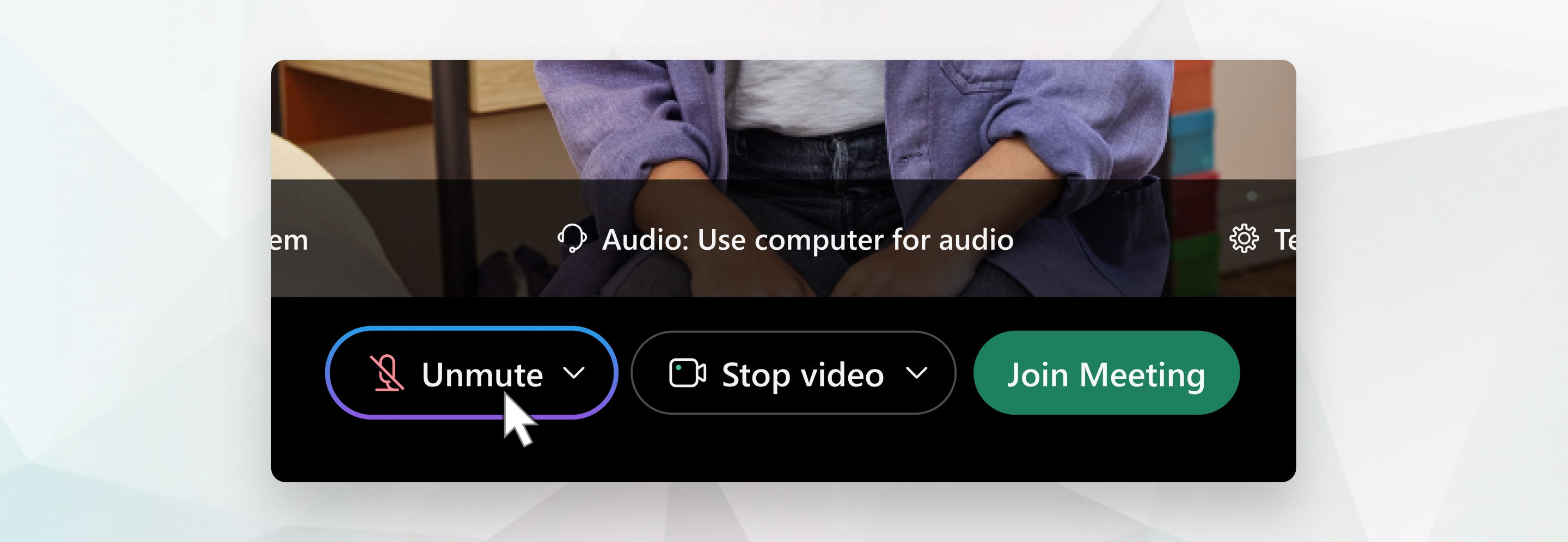
  3. If you want to join the meeting with your audio muted, click Mute Mute.

    You'll see Unmute when your microphone is muted. Click UnmuteUnmute when you want to speak in the meeting.

  4. Start Your Video

    Before you join or start a meeting you can choose the settings you use for video in the meeting.

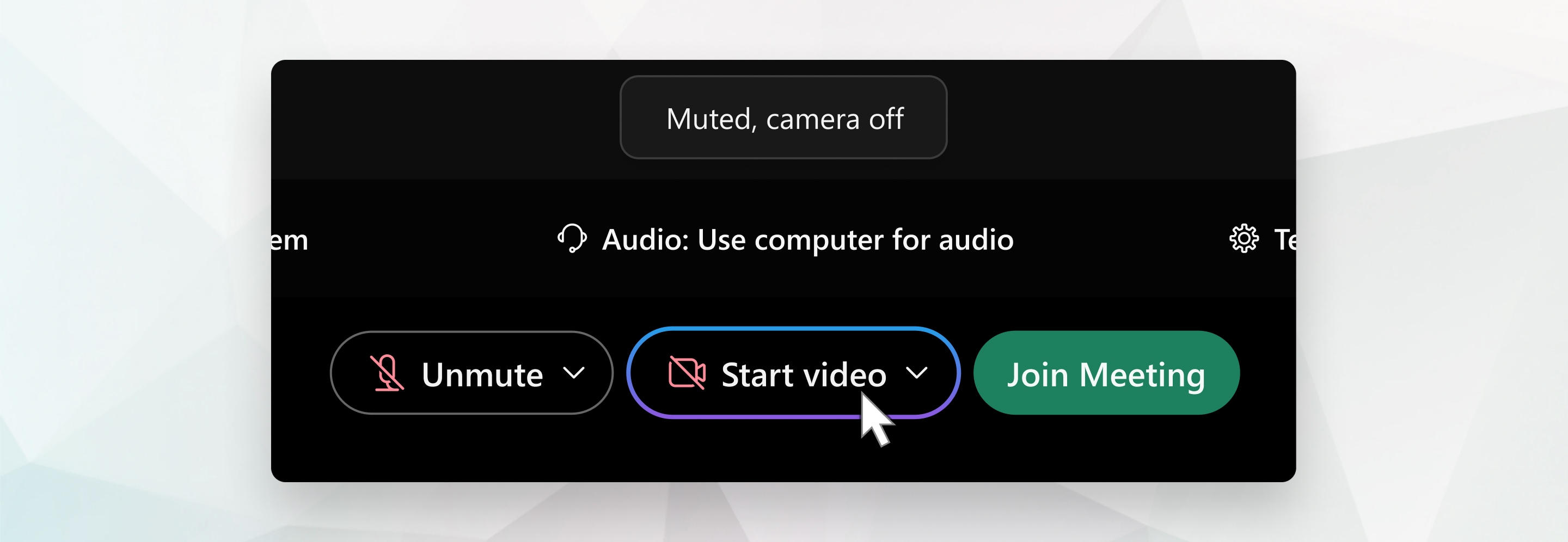
    1. If you want to join the meeting with your video turned off, click Stop video Stop video.

      You'll see Start video when your video is turned off. Click Start video Start video when you want to show your video.

    2. By default, your self-view video shows in mirror view. You can turn off mirror view if you want to see yourself in your self-view video the same way that other meeting participants see you.

      If you're happy with the audio and video settings that you chose for this meeting, you can save them for your next meeting.

    3. If you want added privacy or to limit possible distractions from your video, you can use a virtual background. Click Change background, and then choose to blur or replace your background.

    To join the meeting from a compatible video device, connect to a device.

    Share Content

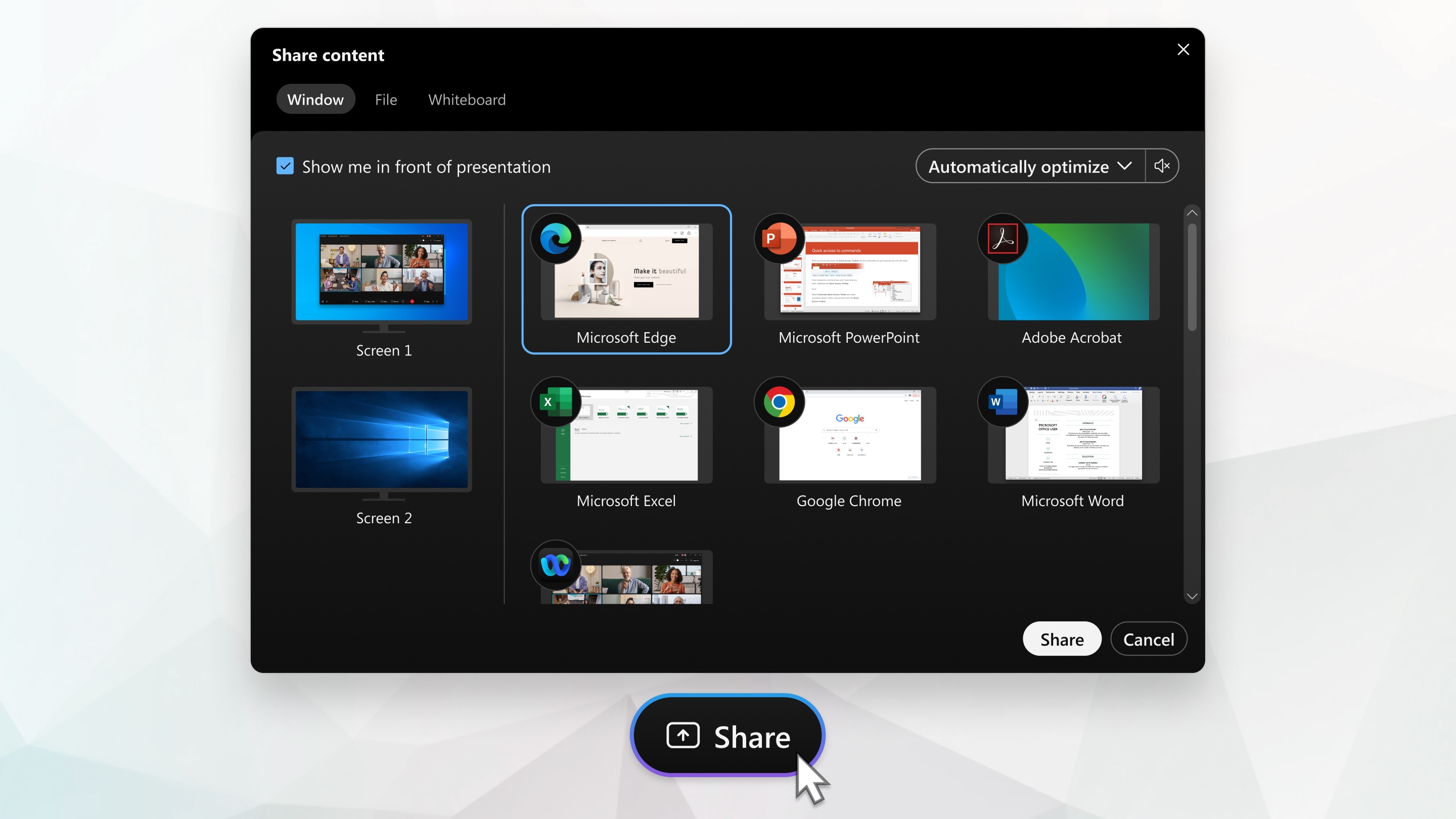
    To share content during a meeting, from the meeting control panel, select Share Share.


    Go to the Share menu for more sharing options.

    Record a Meeting

    Your meetings are important. If your whole team can't be there, or if you want to remember what was said, record your meeting to share later. The recording includes the audio, video, and presentation.

    While in your meeting, click Record Record, and then Record to record right away. You and your participants see a red icon at the top right of your window when recording is in process.

    When the meeting ends, you can find your recording on the Recordings > My Recorded Meetings page of your Webex site. If you recorded in the cloud, when the meeting ends, you receive an email with the recording link. Depending on file size and bandwidth, it can take up to 24 hours to receive your recording.

    High-Quality Video-Supported Cameras

    Most PC-compatible cameras should work with Webex.


10 Educational Websites for English Students

 Below are some valuable resources for ELL and ESL teachers. With these resources, you can find great ways to communicate more effectively, explore lessons, and be a great ELL teacher.


Check out this lexicon that offers images demonstrating the true meaning of the word, making it easier for English language learners to understand.
On this website, you’ll find quizzes, word games, puzzles, and a random sentence generator to help students better grasp English as a second language.
Bab.la is a really fun site for ELL learners, with reference tools like a dictionary and vocabulary, supplemented with quizzes, games, and a community forum.
On this site, you’ll find free English videos for both students and teachers.
 Okanagan College’s resource offers 13 different unit lessons for learning and teaching English pronunciation.
In this website from the BBC, students can find help with grammar, vocabulary, and pronunciation, with plenty of references to current events. Plus, you’ll find a special section for ELL teachers.
ESL Gold is, no joke, golden, with seemingly endless learning resources for English. Students can practice pronunciation, find a book to study, and even talk to someone in English on this site. Plus, teachers can find a job, search for textbooks, discover games, and so much more.
 Check out this free site for learning English, with loads of videos from real English speakers, plus quizzes and community support.
In this online library, students can get access to a huge collection of English texts and scripted recordings.
An awesome resource to use for simple translations, Google Translate can help your students see how its done and better understand translations between two or more languages.


 Direct your students to this ESL cyber listening lab with study guides, quizzes, and even teacher features.
This online tool is designed to help jumpstart students’ vocabulary skills, with more than 90 vocabulary lessons, and the option to create lessons of your own.

Wordsteps: Wordsteps makes it easy for students to build their own vocabulary collection, and even access their vocabulary through a mobile device for English language learning on the go.

Utah Education Network English Language Learner Resources:
 Check out this list of great resources for ELL, with teaching ideas, forums, and even news and research.
 Specially designed for English language teachers, One Stop English has a monthly topics series, news lessons, and even an app for on the go ELL teaching.
This ingenious tool allows ELL teachers to effectively communicate with non-English speaking parents. You’ll be able to quickly make and customize notes that you can translate and send home to parents, effectively communicating information about field trips, conduct, homework, and more.
 A great site for ELL teachers, ESL Party Land has lesson plans, strategies, worksheets, flashcards, quizzes, games, and even vocabulary resources to help you be a better ELL teacher.
 Check out this collection of royalty-free, language-neutral clip art designed to be used for foreign language instruction.
Thousands of teacher contributions can be found on this site full of quizzes, exercises, and tests for teaching English as a second language.
Using this online annotation tool, ELL teachers can write directly on images to explain their meaning to students.
A service of Oxford University Press, this learning resources bank for English language teaching has courses, titles, and interactive English reading tools.
 Encourage students to self-test with this website, offering free English tests, grammar exercises, and worksheets.


There are some other audio video resources i would like to recommend if you are really interested in visual experience
https://youtu.be/hFIGwwE1uAM

https://youtu.be/HXGs0-DZ-xg

https://youtu.be/Zz3w75jn07w

https://youtu.be/juKd26qkNAw

Student's Portfolio

School History:   Madras Christian College Higher Secondary School, Chetpet, Chennai-31. Founding:           MCC School has its roots in a s...